Contracts & e-signing
Contracts are agreements your client e-signs in the browser. Build them from reusable templates with merge fields, send a private signing link, and the signed PDF archives itself on the project — no signer accounts, the link is the gate.
Where contracts live
Two places. Per-project paperwork lives on the hub's Contracts tab: the drafts, the signing status, the PDF. The reusable versions live in Templates → Contracts — your new studio starts with a wedding agreement and a portrait agreement, ready to edit. Beside them sits the clause library: named paragraphs (image usage & licensing, weather policy, retainer non-refundable, delivery timeline) you reuse across every agreement.
The template editor
The editor is a plain-text surface with a slim toolbar — bold, italic, heading, list, link — that wraps your selection in a small allowlist of tags, sanitized again on the server. An Insert field picker offers every merge field; Insert clause drops a saved paragraph at the cursor. A live preview pane labeled signing page renders the exact document your client will see.
Applying copies, never links
Merge fields
Double-brace placeholders fill from real studio, project, and client data at send time:{{client_name}}, {{studio_name}}, {{event_date}}, {{total}}, {{deposit}}, {{session_type}}, legal-name variants for agreement language, invoice number and total, today's date, and the link fields — booking, gallery, portal, and the contract's own {{sign_url}}. The quick composer on a project offers the five classics: client, studio, date, event date, package.
Note: Unknown fields pass through untouched so drafts stay editable, and a field with no data to fill falls back to a human phrase — the scheduled date, not an empty hole.
Send for signature
Statuses: draft → sent → signed, with void off to the side. Sending fills the merge fields and freezes them into the stored body, mints a private token link (kept only hashed and encrypted), and emails the client. Voiding a draft or sent contract stops the link working. Signed contracts can't be changed — by anyone.
What the client sees
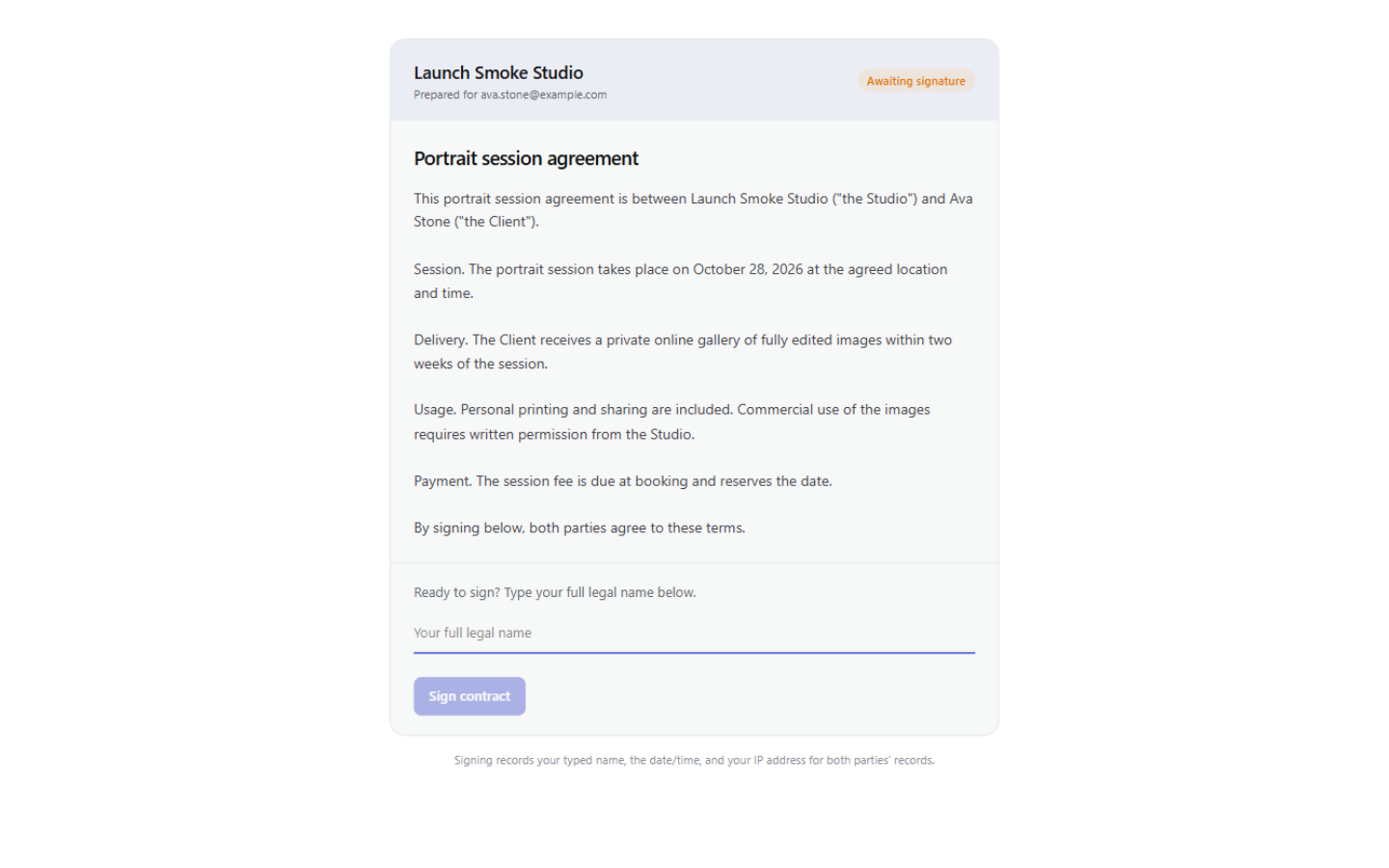
A calm single page on your brand: the studio name, Prepared for their email, the full agreement, an Awaiting signature badge. To sign, they type their full legal name and complete a bot check, then hit Sign contract. The page says plainly what that means: signing records the typed name, the date and time, and the IP address for both parties' records.
The moment it's signed, the page flips to Signed — signer, timestamp, IP, and a Download signed PDF button. A branded PDF (your logo and accent, the signer's name, IP, and the signed-at time) is archived and emailed to both parties; the studio copy respects your contract-signed alert toggle. It stays on the project's Contracts tab, next to the audit entries for sent, signed, and voided.
Evidence, not notarization